Best Auto-Feed Paper Shredders for Busy Home Offices
The top auto-feed shredders listed here are built for high-efficiency, hands-free shredding in a home office or small business setting. This guide highlights models suited for high-volume jobs, strong security, and continuous run times. Best for executives and admins who prioritize privacy and speed, these picks balance auto-feed capacity, security level, and ease of use. A quick summary table follows to help you compare at a glance.
| Product | Auto-Feed Capacity | Security Level | Best For |
|---|---|---|---|
| Bonsaii 120-Sheet Autofeed | 120 sheets | P-4 Micro-Cut | Medium to high-volume workloads; privacy-focused shredding |
| Amazon Basics 200-Sheet Auto Feed | 200 sheets | P-4 Cross-Cut | High-volume shredding with easy maintenance |
| Aurora AU120MB | 120 sheets | P-4 Micro-Cut | Quiet operation and steady performance |
| QUIETLEMON 100-Sheet Auto Feed | 100 sheets | P-4 Cross-Cut | Compact, reliable office shredder with wheels |
| BONSEN 300-Sheet Auto Feed | 300 sheets | Micro-Cut | Large-volume shredding with long run time |
Bonsaii 120-Sheet Autofeed Micro-Cut
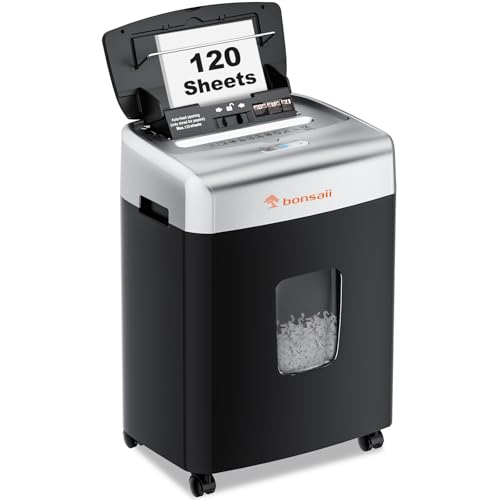
Auto & Manual Shredding: 120 sheets automatic shredding, plus 12 sheets manual shredding for mail, cards, and staples. Non-stop shredding runs 30 minutes auto, 60 minutes idle; manual runs 10 minutes on, 60 minutes off. Shred speed is 71 inches per minute. Best for busy offices needing fast, high-volume auto shredding with occasional manual capability. This model delivers strong privacy protection with a P-4 micro-cut (5/32″ x 15/32″).
Best for: professionals handling frequent confidential documents and large mail batches. Choose this if you value long auto run time and solid micro-cut security. Caution: heavy use requires cooling intervals as recommended.
Amazon Basics 200-Sheet Auto Feed

Cross-cut shredding produces confetti-like pieces (approx. 5/32 x 25/32 inches; 4 x 20 mm). It meets P-4 security standards, with 200-sheet auto feed and 10-sheet manual capacity. Run time reaches 60 minutes auto, or 10 minutes manual, with a 45-minute cool-down period after auto use. Best for high-volume document destruction with minimal user intervention.
Best for: offices needing substantial auto-feed capacity and a straightforward maintenance profile. Limitation: auto feed requires careful stacked loading to avoid jams.
Aurora AU120MB 120-Sheet Auto Feed

Automatic shredding with up to 120 sheets, plus manual capacity for 10 sheets. Shreds into small pieces (5/32 by 15/32 inches) at P-4 security. Nonstop 30-minute continuous run time enables longer shredding sessions without frequent pauses. Quiet operation is a practical benefit in a shared office space.
Best for: users who want strong security and reliable automatic performance with a relatively quiet profile. Limitation: the higher auto-load may benefit from a steady paper feed to prevent jams.
QUIETLEMON 100-Sheet Auto Feed

100-sheet auto feed with 40-minute non-stop operation. Cross-cut security at P-4 level provides robust data destruction. Manual feed supports up to 6-7 sheets depending on paper weight. Wheels enhance mobility, and a 4.5-gallon bin provides compact storage. Caution: manual feed time is shorter, so plan for longer auto sessions.
Best for: small-to-medium home office setups needing a balance of capacity, security, and mobility. Avoid this if you require frequent CDs or rigid metal cards in the mix.
BONSEN 300-Sheet Auto Feed

300-sheet auto feed with 12-sheet manual capacity, designed for high-volume days. It features a long 60-minute auto-running window and a 30-minute manual run time, aided by an efficient cooling system for extended use. This model is best for large offices or departments with frequent shredding needs.
Best for: heavy daily shredding without frequent breaks. Limitation: higher capacity units may require more floor space and regular maintenance to sustain performance.
Buying Guide
How to choose the right auto-feed shredder for your needs:
- Auto-feed capacity: Match the daily volume to the sheet capacity. Higher numbers reduce manual feeding and speed up workflows.
- Security level: For sensitive information, prefer P-4 micro-cut or cross-cut shredders. Micro-cut yields smaller particles, making reconstruction difficult.
- Run-time and cooling: Look for continuous run times that fit your typical shredding sessions. A longer auto-run reduces downtime but may require longer cool-downs after use.
- Manual feed flexibility: Some models offer manual slots for occasional nonstandard items like staples, cards, or thicker papers. Consider your needs for mixed-material shredding.
- Waste bin size and disposal: Larger bins reduce emptying frequency. Check bin access and ease of emptying to maintain workflow.
- Noise and footprint: If the shredder sits in a shared space, quieter models with compact footprints may be preferred.
Frequently Asked Questions
- What does P-4 security mean?
It indicates a high-security level where shredded pieces are small enough to be unreadable, typically 5/32″ x 15/32″ or smaller. - Is auto-feed safe for mixed paper types?
Auto-feed is designed for standard letter-size paper. Some models allow limited manual feed for staples or small cards; avoid metal items in auto mode unless specified by the manufacturer. - How often should a heavy-duty shredder be cooled?
Most models provide 30–60 minutes of continuous auto shredding, followed by a cool-down period; follow the user manual for optimal performance. - Can these shredders shred CDs or credit cards?
Many models offer cross-cut or micro-cut destruction for credit cards and some support CDs in manual mode. Check each product’s capabilities before use. - What maintenance helps extend shredder life?
Regular oiling, clearing jams promptly, and avoiding overfilling the auto tray help maintain performance and longevity. - Which model is best for a small home office?
For compact spaces with moderate volume, a 100–120 sheet auto-feed shredder with wheels and solid security is typically ideal.